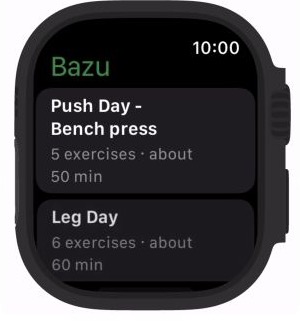
Choose the workout from your Watch.
Open Bazu on Apple Watch, choose a saved routine, and begin without bringing your iPhone into the session. The workout remains fully on-device until you're ready to reconnect.
Apple Watch workout tracker
Leave your iPhone behind. Train from your wrist.
Choose a routine on Apple Watch, log weight and reps with the Digital Crown, follow smart-rest haptics, see live heart rate and PRs, and complete the workout fully on-device.


Phone-free Apple Watch workouts, set logging, live heart rate, and smart rest, with next-set targets on your wrist.

Open Bazu on Apple Watch, choose a saved routine, and begin without bringing your iPhone into the session. The workout remains fully on-device until you're ready to reconnect.
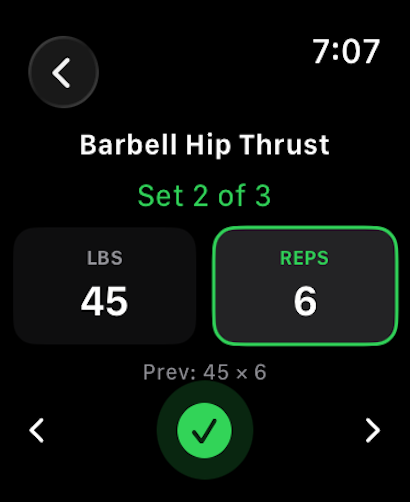
Turn the Digital Crown to enter weight and reps, check off the set with a large target, and keep training without unlocking or carrying your phone.
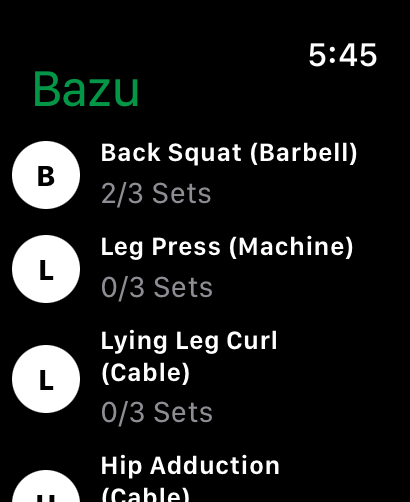
See every exercise and set count in the active workout, jump between movements, and finish the session from the Watch.
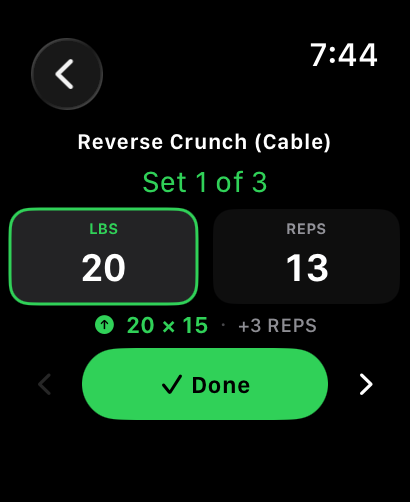
The Watch shows the recommended weight and reps beside your current set, based on your recent training history and selected progression pace.
Choose a saved routine directly from your wrist. No iPhone is needed during the session.
Log each set, view previous numbers, and follow the synced rest countdown and haptics.
Complete the session from your wrist. When the Watch reconnects to iPhone, the workout and Health data sync automatically.
Your workout history and core progress data stay useful without a subscription. Compare the Premium features available on your platform below.
Everything in Free, plus:
U.S. pricing shown; local prices are confirmed in the app. Subscribe in the app. Cancel anytime. The free tier stays free forever.
Bazu for Apple Watch can run the full workout on-device. Choose a routine, log every set and rest period, and finish from your wrist; reconnect to iPhone later for automatic sync.
Questions before your first set.
Yes. Starting workouts on Apple Watch, set logging, previous-session numbers, the smart rest timer, haptics, live heart rate, and finish-from-Watch control are included in Bazu Free. Premium adds automated overload targets on the wrist.
Yes. Choose a saved routine directly on Apple Watch and complete the entire workout on-device. Your session syncs automatically when the Watch reconnects to iPhone.
Yes. Select weight or reps, turn the Digital Crown to adjust the value, and tap Done to complete the set.
The completed workout syncs automatically, including its sets and available Health data. No manual transfer is required.
The progressive overload recommendation shown beside your active set requires Bazu Premium. The core Watch workout tracker remains free.
Use a relevant calculator, exercise guide, or training article before your next session.
Choose practical rest periods for strength, muscle, and endurance work.
ExploreExerciseReview setup, bar path, muscles worked, and safe progression.
ExploreCalculatorTurn your best recent set into a practical next-session target.
ExploreProduct updateRead how Bazu runs full workouts on Apple Watch and syncs when you reconnect.
ExploreDownload Bazu, log your first set, and decide later whether Premium earns a place in your training.